02 / 07 · Case studyAI SaaS
Alerts that tell CSMs which accounts need attention.
Helping CSMs decide which accounts need attention
I designed Account Flagging, the first module of Sciene’s Companion platform. Our first version showed every alert the system could find, and CSMs ignored two-thirds of them. v1 shows fewer alerts and explains why each one fired.
- 34% → 82% alerts acknowledged within 24 hours, after v1 launched
- −75% time to build the morning priority list (timed before and after, same CSMs)
- 92% daily adoption across 250 CSMs
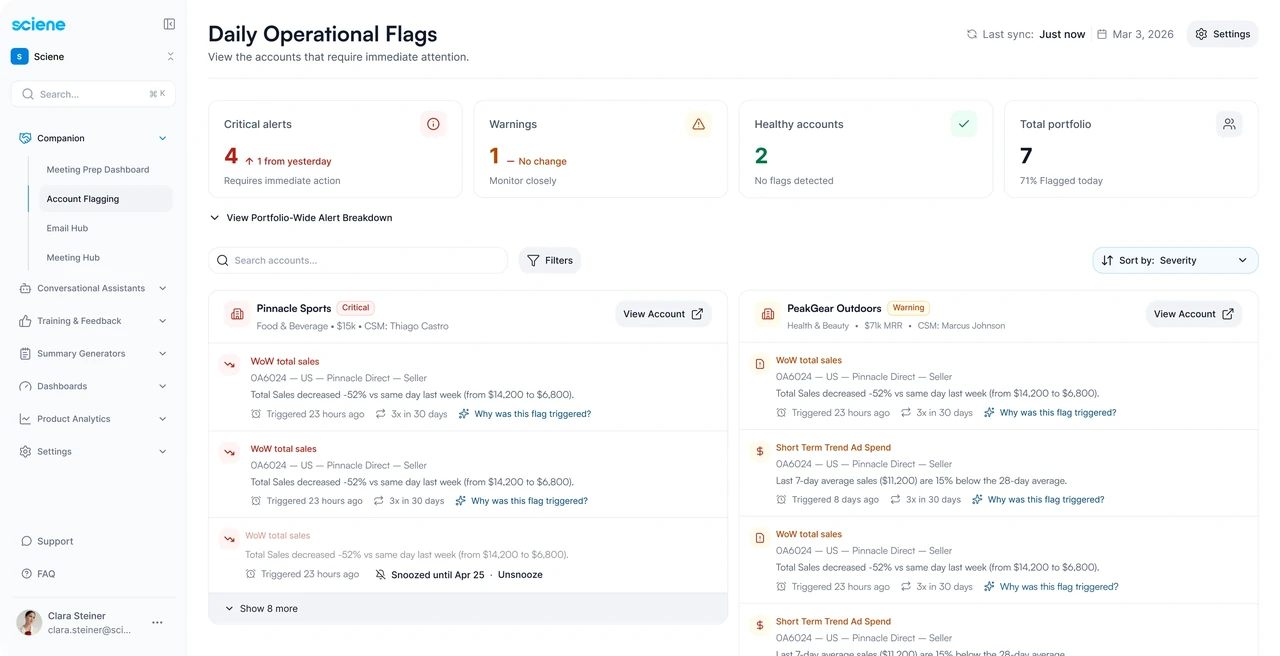
Problems surfaced when the client called
CSMs at Sciene’s enterprise clients each manage 10 to 20+ accounts. Sales drops, ad spend spikes, listing suspensions and late payments usually came to light when a frustrated client called. Teams tracked accounts in an external dashboard that sat outside the rest of their tools.
Companion puts the CSM’s day in one product. Account Flagging is where the morning starts, before the Email Hub and the Meeting Hub.
- Account FlaggingSurfaces accounts that need attention.
- Email HubHelps the CSM respond in writing, with account context.
- Meeting HubBrings open flags and conversations into meeting preparation.
Over six weeks I interviewed 12 CSMs across account tiers and 3 directors. I asked where they looked for problems, which data they trusted, and when they asked for help. Before treating an account as at risk, they cross-checked its history, recent activity and performance metrics by hand. So every flag had to show why it fired and the signals behind it: the same checks CSMs were already doing manually.
Why was this flag triggered?
Over the past 7 days, this account’s advertising cost of sales (ACoS) increased from 24% to 36%, exceeding its 30% target. Ad spend increased by 22% while attributed sales declined by 18%, indicating that campaigns are becoming less efficient.
The first version was comprehensive, not meaningful
Our first version showed every alert the system could generate. In testing, CSMs couldn’t keep up. The AI insights were usually correct, but they didn’t help anyone decide where to start.
I built a Claude artifact connected to Databricks to pull acknowledgment data from v0. Within a week the numbers were clear: only 34% of alerts were acknowledged within 24 hours. The rest were ignored, snoozed indefinitely or buried under newer ones.
- ACoS above targetNorthwind OutdoorsACoS 36% against a 30% target, usual range 18–28%Why was this flag triggered?
- Sales dropped 32%Harbor & Pine Home$9.4k against $13.8k last week, limit −20%Why was this flag triggered?
- Listings suspendedBrightleaf Pantry4 listings down for 2 days, limit 24 hoursWhy was this flag triggered?
3 alerts. 82% acknowledged within 24 hours.
Fewer alerts, each with its reason
The team considered more filters. They made it into v1, but on their own they would only have hidden the noise. Most of it came from thresholds that treated normal spend fluctuations and similar swings as risk. So we fixed the thresholds.
With CSMs and their directors, I went through them one by one and decided which alerts deserved attention. The AI engineers turned those decisions into rules. I’d prototype a rule, they’d test it against production data, and we adjusted until the false-positive rate was one CSMs accepted. What was left were real risks, so they got attention.
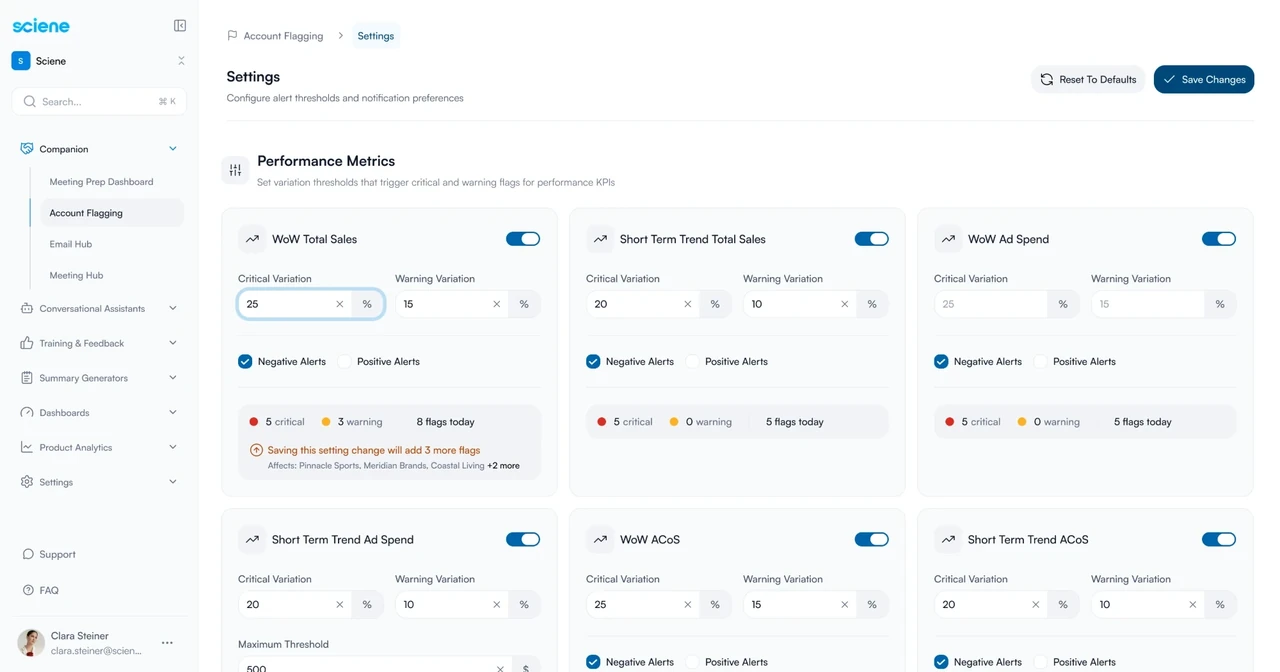
Variation for critical alert
AI explanations load when a CSM asks
Every alert already shows its numbers: the observed value, the threshold and the historical range. The AI insight adds a written explanation on top. Generating one for every alert would spend tokens on text nobody read, so we generate it only when a CSM opens the alert.
That turned the cost into a wait, at the moment someone wants context. The numbers stay on screen, and a skeleton holds the explanation’s space while it generates, so the panel doesn’t jump when the text arrives.
ACoS above targetCritical
Northwind Outdoors · US · Seller
ACoS 36% against a 30% target, usual range 18–28%
Directors see the same alerts, rolled up
Once CSMs had their morning sorted, directors needed a view across the team. The Director Dashboard shows MRR under alert for every CSM, resolution rates and a priority ranking by workload. Every number comes from the same rules the CSMs see.
Overview · Current month
Last 30 days vs previous 30 days
Active Alerts by Category
Breakdown across all CSMs
CSMs · Priority ranking
Sort by Number of alerts- Alerts this month12 critical · 6 warning18+8
- Resolution rateavg. 1h to resolve56%−14 pts
- Flagged streakVitacup12d+5d
This month · by status
- Resolved10
- Snoozed3
- Asked for help5
By category
- Performance10
- Financial5
- Business3
Trend
| Period | Critical | Warning | Resolved | Snoozed | Help |
|---|---|---|---|---|---|
| Yesterday | 2 | 1 | 1 | 1 | 1 |
| Last 7 days | 6 | 3 | 5 | 1 | 3 |
| This month | 12 | 6 | 10 | 3 | 5 |
| Last month | 6 | 4 | 7 | 1 | 2 |
CSMs can mark an account as “asked for help.” The request appears in the director’s view, and the CSM sees when it’s been acknowledged.
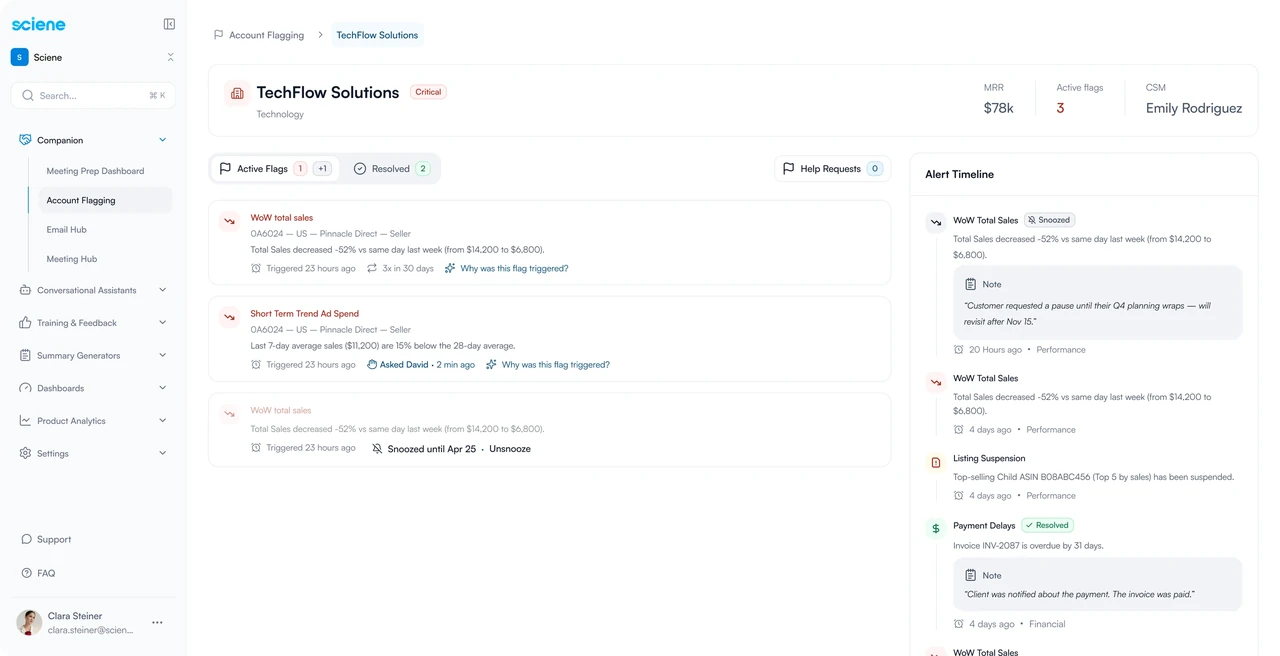
One set of alert components across three modules
I built the design system from zero alongside v1: tokens, a component library, accessibility standards and handoff documentation. Alert states, severity and acknowledgment controls became shared components across Account Flagging, the Email Hub and the Meeting Hub, which I also designed. The v2 Director Dashboard was built entirely from existing parts.